%20(3).png)
Episode 8 - Verblio: How Ryan Sargent is cutting through the content echo chamber
Read more

As I’ve written before on this blog, iteration is not the same thing as improvement.
One thing I’ve come to learn (often the hard way) is that it’s hard to get good feedback on your writing. Some people are lucky to work with a great editor. I’ve worked with a few great editors over the years and it’s an absolute joy. Not only does a great editor make sure you’re publishing your best work, but they teach you to fish. Your skills grow as you work with them.
Many of you have probably had similar experiences, but for some, it’s elusive. And often, feedback turns into busy work. The writer doesn’t ask for specific enough criticism and the provider offers stream-of-consciousness reactions to the piece as they skim it. The result is that the piece is iterated on, but probably not improved upon. A recent piece called Collaboration Sucks on the PostHog blog captures this idea well: “People want to be helpful. For example, when someone posts their work-in-progress in Slack, others feel obliged to give feedback.”
In this article, I’ll explain a supplemental way to get great feedback, but I want to be clear that nothing can replace a great editor.
Whether you have access to one or not, I think that synthetic feedback can be a great way to find gaps in your writing, put yourself in your readers’ shoes and pressure test your work before shipping. Synthetic feedback means creating AI personas with a distinct point of view that can offer feedback on your work.
A time-strapped content manager with traffic targets tied to her bonus reads differently than a VP who needs to justify $200k in content budget to a CFO. Both might be in your audience. Both will have completely different reactions to the same article.
Don’t worry if the idea of synthetic feedback feels foreign. It’s relatively new to me, but it’s an AI use case I’m pretty excited about. Here’s the gist of it:
The reason this is awesome is because synthetic feedback is nearly instant. Also, you can force it to give you critical feedback from a POV that is a blind spot for you. In fact, you can even ask what your blind spots are so you can uncover them. Like I said, I’d prefer to work with a great human editor any day, but I also like to move quickly. Imagine running through this process before sending a piece to your editor so that it can be as tight as possible.
And, of course, a quick warning: Your AI personas will provide you with TONS of feedback. It does not replace your own editorial judgement. As you uncover bad feedback, tell Claude so it can improve. But please don’t turn your brain off while implementing dozens of changes from synthetic feedback. This is a handy AI use case, not a replacement for sharp thinking and good taste.
I’ll show you a quick way to do this in Claude. This is my AI tool of choice, but it’ll work with any chatbot.
If you have a doc or deck on your ideal customer persona(s), then this step is basically already done. If you don’t, I recommend brain-dumping everything you know about your target audience into Claude.
In both cases, use the following prompt to create synthetic personas for each:
You are creating synthetic user personas that will review content and provide feedback from their unique perspective. These personas should feel like real people with specific contexts, constraints, and needs.
## Input Required

Provide basic information about your ICP, including:

- Role/title

- Company stage/size

- Team structure (if applicable)

- Primary responsibilities

- Key challenges or pain points

- Industry or vertical (if relevant)

## Your Task

Transform this raw ICP data into a fully-developed persona with the following sections:

### 1. Background (2-3 sentences)

- How long in role

- Career path to current position

- Team structure and reporting relationships

- Company context (stage, size, industry)

### 2. Daily Reality (3-4 sentences)

- What they actually do day-to-day

- Who they collaborate with

- What they're measured on

- What success looks like in their role

### 3. Pain Points (4-5 specific bullets)

- What keeps them up at night

- Resource constraints (time, budget, authority, team)

- Competing priorities and tensions

- Gaps between what's expected and what's possible

### 4. What They Need from Content (2-3 sentences)

- What makes content useful vs. useless for them

- What helps them do their job better

- What helps them advance their goals or make decisions

### 5. Review Lens (2-3 sentences)

- What filter they'll use when evaluating content

- What questions they'll ask

- What they'll be skeptical about

## Format

Structure each persona as a standalone profile with a name, title, and these five sections. Write in a way that captures their voice and perspective, not just lists their attributes.

### Example Structure

```

## [Name]

Background:

[Brief career context]

Daily reality:

[What their work actually looks like]

Pain points:

- [Specific challenge]

- [Specific challenge]

- [Specific challenge]

What they need from content:

[How content can help them]

Review lens:

[How they'll evaluate content]

```
I did this for Superpath and here are the personas I created.
Download each persona as a Markdown file and keep them somewhere easy to access since you’ll need them regularly.
When you have a draft ready for review, you can paste it into Claude with the following prompt. Also, upload the Markdown files containing your AI personas. You will need to customize this prompt with some specific information about your personas and the article you want to review.
(I put all the prompts and examples in a Google Drive folder, which you can access here.)
You are reviewing this article as [NUMBER] different professionals. Each persona should provide feedback from their unique perspective, work context, and experience level.

## Your task for each persona:

### 1. Initial reaction

What's your gut response to this content? Does it speak to someone in your role?

### 2. What works

Identify 2-3 specific elements that resonate with your experience and needs. Quote specific passages.

### 3. Critical gaps

What's missing that someone in your position absolutely needs to know? What questions does this leave unanswered? What assumptions does it make that don't match your reality?

### 4. Practical blindspots

Where does the content fail to account for your constraints (budget, team size, authority, time, resources)?

### 5. Credibility issues

What feels disconnected from how this work actually happens at your level? What advice would be difficult or impossible to implement in your context?

### 6. Missing examples

What specific examples, data points, or scenarios would make this more useful for you?

### 7. One critical fix

If you could change ONE thing about this article to better serve someone in your role, what would it be?

---

## Review as:

[Persona 1 Name & Title] - Focus on [their primary lens, e.g., "tactical execution and resource constraints"]

[Persona 2 Name & Title] - Focus on [their primary lens, e.g., "strategic gaps and business case elements"]

[Persona 3 Name & Title] - Focus on [their primary lens, e.g., "client-facing application and efficiency"]

---

## Instructions:

Be direct and honest. Your goal is to find the holes, not just validate what's there.

After providing detailed feedback from each persona, create a table with the following columns:

- Persona

- Gap/Issue

- Recommended Change

Then create a prioritized list of the top 5 additions that would have the biggest impact across all personas.

---

## [PASTE ARTICLE URL OR TEXT HERE]
I did this on the most recent piece I wrote for the Superpath blog, How to have influence without traffic or readers, and here’s the output. I find that the summary table is the most helpful way to understand feedback at a glance.
If you haven't created a Claude Skill yet, this is the perfect opportunity to try it out.
A Claude Skill is a miniature automation that can be triggered within a Claude chat. In this case, all you would need to say is something like, "Here's an article for review." That will automatically trigger the skill, which will lean on the prompt we created to ask for feedback as well as the personas we created to provide the different points of view.
My favorite thing about a Claude Skill is that it helps you formalize a process. Sure, you could store these Markdown files on your desktop and upload them each time you need feedback on an article, but that is cumbersome and perhaps more importantly, it’s a sign that the process is not refined to the point where you are able to formalize it. Creating a Claude Skill forces you to refine the process to the point where you feel comfortable that it’s repeatable. And this is what turns a nifty AI use case into a recurring time saver.
Since you've already used Claude to create your personas and you have the prompt for asking the personas to provide feedback, all you have to do is ask Claude to help you turn it into a Skill. It'll ask you a series of questions. I find this to be very helpful for points of clarification. Once Claude has what it needs, it'll build you a skill, which it outputs as a .skill file.
I created a Claude Skill for Superpath using the personas that I shared earlier in this article. Unless you sell to the exact same personas that we do, this won't work for you but it's a good example to see how it works. You can download it here and then add it to your Claude skills library to try it out. Just open the file, and assuming you have the Claude desktop app for Mac, it will prompt you to save it to your library.
To trigger the skill, just open a new chat and ask Claude to review an article. It’ll recognize that you want to use the article review skill.
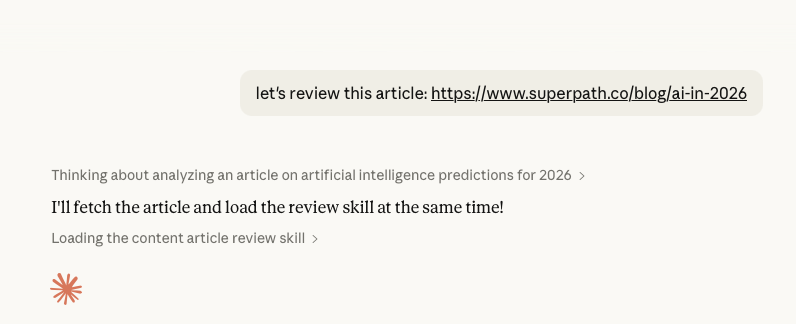
It’ll run through the Skill, which includes the feedback prompt and the personas, then output the feedback in the chat. If you want to take this to the next level, connect Claude to Google Docs or Notion and ask it to leave feedback in the same document where you are writing.
Before publishing, I sent this article to Eric and Alex for review, but before I did that I ran it through the Claude Skill. There's no point in asking for Eric and Alex's time to do a first pass on this article. I'd much rather use their expertise to gut check that the topic will resonate with the Superpath readers and lean on their expertise to sift through the nuances of the article.
This is a helpful way for me to improve the piece, but I also think of it as a respectful gesture towards the people I rely on for feedback.
In case you missed it, Eric did an AI Show & Tell recently where he showcased a few other Claude Skill examples. I used that to better understand Claude Skills so I could write this piece. Superpath Pro members can watch that here.
If you aren’t already a member, now is a great time to check out Superpath Pro. We have tons of programming happening right now, including:
And more! If you aren't a Superpath Pro member, you can try it free for 30 days. Hope to see you in Slack!
.svg)
Jimmy is the cofounder and former CEO of Superpath. He's currently an advisor and contributor via the blog and podcast. You can follow him on LinkedIn.
%20(2).png)
